Marketing
Email & SMS Campaigns
Lifecycle campaigns by email, text and Facebook or Instagram message, with the Email Campaign Agent (Beta).
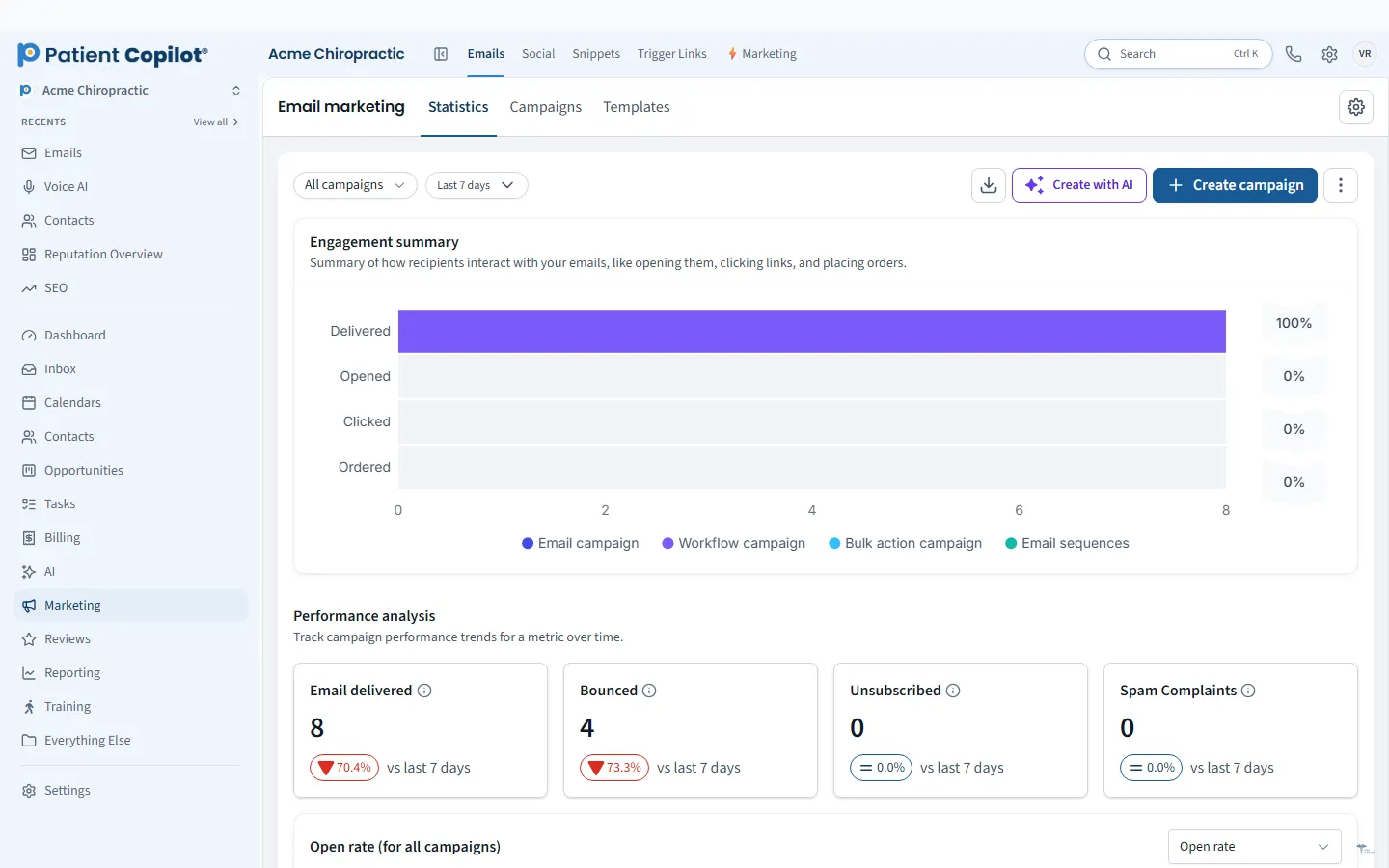
What it does
What Email & SMS Campaigns gives your practice
- Lifecycle email with the Email Campaign Agent (Beta)
- Text message (SMS) campaigns to opted-in patients
- Facebook and Instagram messages to opted-in contacts
- Replies from every channel land in the Patient Inbox
- One set of patient lists for email, text and social
Email & SMS Campaigns in detail
HIPAA compliant email and text campaigns help your practice stay in touch with patients between visits without adding hours to your week. PatientCopilot lets you send lifecycle email, text message (SMS) campaigns and Facebook or Instagram messages from one place, to patients who have opted in.
Campaigns patients actually open
Patients hear from many businesses. Campaigns work when they are timely and useful.
- Lifecycle email, supported by the Email Campaign Agent (Beta)
- Text message campaigns to opted-in patients
- Facebook and Instagram messages to opted-in contacts
Typical messages include a welcome after the first visit, a seasonal care tip, a reminder to come back, or an announcement about a new service or event.
Reactivate lapsed patients
Every practice has patients who meant to return. A short series of messages can bring them back.
- Build a list of patients who have not visited in a while.
- Send a friendly check-in by email, then a text a few days later.
- Include a booking link so replying takes one tap.
- Move anyone who replies into your New-Patient Pipeline or onto your calendar.
Chiropractors, physical therapists, dental offices, med spas and wellness practices all use recall campaigns to keep their schedules full.
One set of patient lists
You do not need separate audiences for email, text and social. The same Smart Lists drive every channel, so segmenting once pays off everywhere. For example, a list of new patients can get a welcome email and a text that links to your intake forms.
Start with a small, useful series rather than a big blast. A three-message welcome for new patients or a gentle recall for lapsed patients is easy to write and easy to measure. Keep subject lines plain, write like a person and include one clear action, such as a booking link.
How it works
- Build or choose a patient list in Patient Records & Lists.
- Pick the channel: email, SMS or Facebook and Instagram messages.
- Write the message, or draft it with the Email Campaign Agent (Beta) and edit it.
- Send now, or schedule it to run on its own.
- Review replies in the Patient Inbox and follow up.
Consent and opt-outs
Message only people who have agreed to hear from you, and make it easy to stop. Text and social channels require opted-in contacts, so keep your lists clean and honor opt-outs promptly. This protects your patients and your reputation.
Replies in one place
Campaigns invite replies. Whether a patient answers an email, a text or a Facebook message, the response lands in the Patient Inbox, tied to their record, so no response gets lost in a marketing tool.
Use Social Media Calendar for organic posts, Reviews & Testimonials to ask for feedback after a visit, and Automation Workflows to trigger messages based on what patients do. Email & SMS Campaigns are included in the Copilot plan and in Autopilot, and the AI email marketing page has more on lifecycle email.
FAQ
Email & SMS Campaigns questions
Is email marketing to patients HIPAA compliant?
PatientCopilot is a HIPAA-compliant platform. Keep marketing messages general, such as hours, seasonal tips and offers, and leave individual health details out of campaigns.
Can I text a promotion to existing patients?
You can send text campaigns to patients who have opted in. Build your list from opted-in contacts and keep promotions relevant.
What is the Email Campaign Agent?
It is an AI helper, currently in Beta, that supports lifecycle email so campaigns can send themselves.
Where do patient replies go?
Replies from email, text and social messages all land in the Patient Inbox.
Learn more
Go deeper on Email & SMS Campaigns
Ready to get started?
Sign up today and put an AI copilot on your front desk. Backed by a 14-day money-back guarantee.
14-day money-back guarantee. Cancel anytime.